
Go to Mac platform Display platforms icon
Go to Mac platform Go to Windows platform Go to Android platform Go to iOS platform
Scribus icon

Scribus

1.7.3
4 1 reviews
92.3 k downloads
security security

Free software for laying out publications and documents

Advertisement
Remove ads and more with Turbo
Advertisement
Remove ads and more with Turbo
Álvaro Toledo icon
Reviewed by
Álvaro Toledo
Chief Content Officer
Álvaro Toledo is part of Uptodown's in-house Editorial Team. Translated by Uptodown Localization Team

These days it's possible to use free software for almost everything, including document layout, a function that can be carried out with Scribus, a multiplatform open-source alternative to QuarkXPress

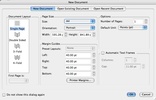
Select the correct paper format for the project; indicate the size and orientation; don't forget to adjust the margins, which are fundamental for getting a balanced design. It's also possible to use templates.

Advertisement
Remove ads and more with Turbo

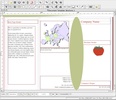
The next step consists of drawing the screentone over which the elements will be placed and define the sample pages. This characteristic allows you to save time not having to create the base page over and over again. Another way ot save time is to create personalized paragraph and line stiles (threads).

The elements that you insert in the page (text boxes, images, tables, shapes, polygons, Bezier curves...) can be grouped to facilitate page editing and locked to prevent unwanted changes.

With support for CMYK and ICC color administration, Scribus can save projects in PDF format without requiring help from another application. What's more, it also allows you to create PDF documents with editable controls (text boxes, check boxes, lists, etc.).

Scribus is for you if

✓ You want professional page layout with customizable formats, orientations, margins, and reusable templates
✓ You need efficient workflows using master pages and personalized text styles to save layout time
✓ You value precise publishing control with grouped elements, CMYK management, and interactive, form-enabled PDFs

Information about Scribus 1.7.3

Basic information

Developer Free Software Foundation
Category Design
Rating +3
Languages English

Distribution model

Pricing Free
License GPL 2.0
Source code
Copyright © 2026 Free Software Foundation
Why is this app published on Uptodown? (More information)

Security and privacy

Required permissions Not applicable
See security and antivirus report

Download info

Downloads 92,295
Date Apr 14, 2026
File type DMG
Size 234.34 MB
SHA256 9b8564663b369b75c86d129f97daea7379fee95feeaacf34fd9bf063f7d9e79b
Advertisement
Remove ads and more with Turbo

Older versions

See more
dmg 1.6.5 Dec 15, 2025
dmg 1.6.4 Apr 21, 2025
dmg 1.6.3 Jan 9, 2025
dmg 1.6.2 Jun 17, 2024
dmg 1.6.1 Feb 12, 2024
dmg 1.6.0 Jan 2, 2024
Available for other platforms

Rate this App

Review the app
Scribus icon

Rating

4.0
5
4
3
2
1
1 reviews

Comments

horst119 icon
horst119
in 2019

Hello, when will Scribus 64-bit for MacOS 10.15 Catalina be available? Or is there perhaps already a beta version that I could test? regards, Horst

53
Reply
Advertisement
Remove ads and more with Turbo
Blender icon
Free 3D Model application to create 3D images
Sweet Home 3D icon
Design in 2D and automatically transform them in 3D
Synfig Studio icon
Professional 2D animation tool
Canva icon
Create designs from hundreds of resources
SketchUp Pro icon
Comprehensive 3D modeling and design solutions
Comic Life icon
Convert a series of photographs into a comic
Shapr3D icon
Create and edit 3D designs
Google SketchUp icon
3D design made easy by Google
Brave Browser icon
A user-friendly and secure ad-free browser based on Chromium
Citra icon
The best Nintendo 3DS emulator for Mac
Tor Browser icon
Anonymous and secure browsing for Mac
Mozilla Firefox icon
Cross-platform open-source web browser
balenaEtcher icon
Create self-booting external disks on Mac
Colibri icon
Experiment with advanced AI on your Mac
Cherry Studio icon
Work with multiple AI models from a single place
GitHub CLI icon
Manage your GitHub developments from the terminal
Adobe Photoshop icon
The most famous image editor&creator, now for Mac
Canva icon
Create designs from hundreds of resources
GIMP icon
Free software to create and edit images
Blender icon
Free 3D Model application to create 3D images
Adobe Camera Raw icon
Now you can work with your photos in RAW format
Inkscape icon
Free software to create vector graphics
Picasa icon
Upload images to Picasa and manage them
Darktable icon
An incredibly powerful photo processing tool